
아래의 방법대로 엑셀 설정을 변경한 후에 CSV 파일을 작업하면 데이터 깨짐 현상없이 정상적으로 저장됨을 확인하였으니 참고하시기 바랍니다.
How to save the CSV file as UTF-8 in Microsoft Excel?
The steps are as given below:
- Open the CSV file with Microsoft Excel sheet.
- Navigate to File menu option and click Save As. The window appears as shown below:
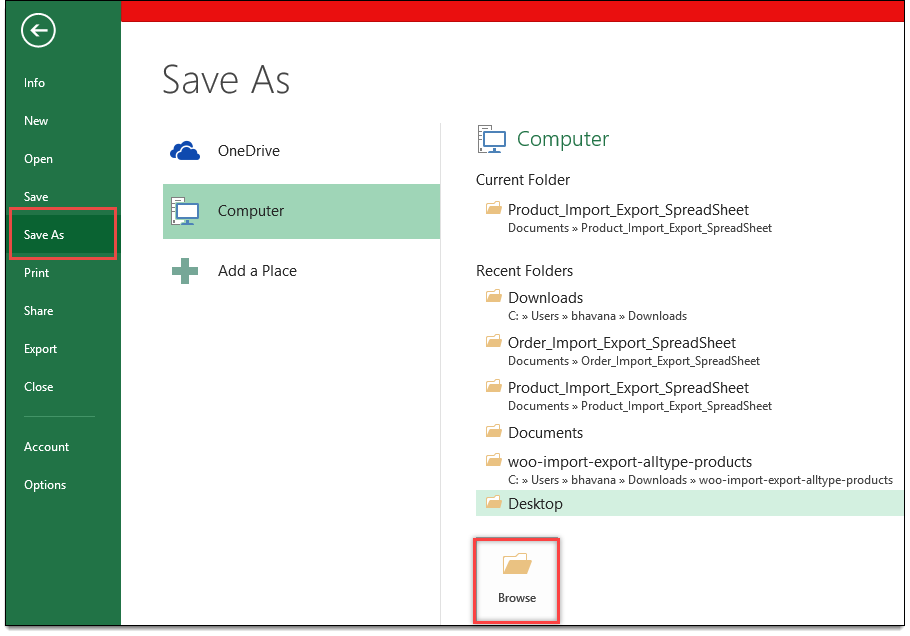
Save As option in Microsoft Excel - Click Browse to select a location to save the file.
- The Save As window appears as shown below:
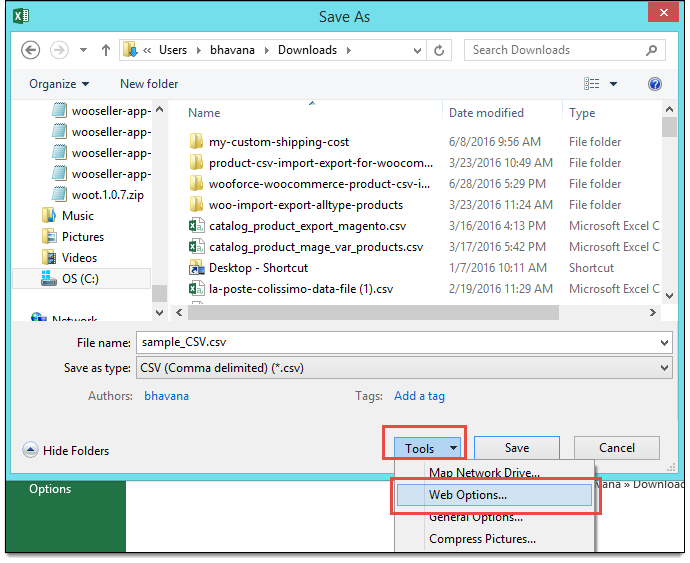
Save As option in Microsoft Excel - Next, enter the name of the file.
- Select the Save as type as CSV (Comma delimited) (*.csv) option.
- Click Tools drop-down box and click Web Options. A new window for web options appears as shown below:
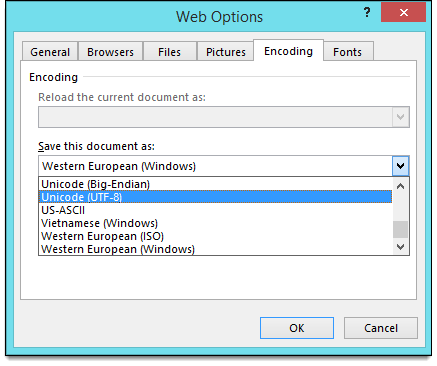
Web Options - Under Encoding tab, select the option Unicode (UTF-8) from Save this document as: drop-down list.
- Finally, click Ok, and save the file.
(출처 : https://www.webtoffee.com/how-to-save-csv-excel-file-as-utf-8-encoded/)
댓글
댓글 1개
좋은 정보 감사합니다.
댓글을 남기려면 로그인하세요.